Local-first subtitle studio
Turn video into subtitles.On your machine, not the cloud.
MonoSub runs speech recognition and translation entirely on your Mac or PC. Your recordings are never uploaded — no account, no subscription, no per-minute meter.
Free to start. Unlimited batch unlocks with a one-time Pro license.
- 100% on-device
- Free to download
- One-time Pro — never a subscription
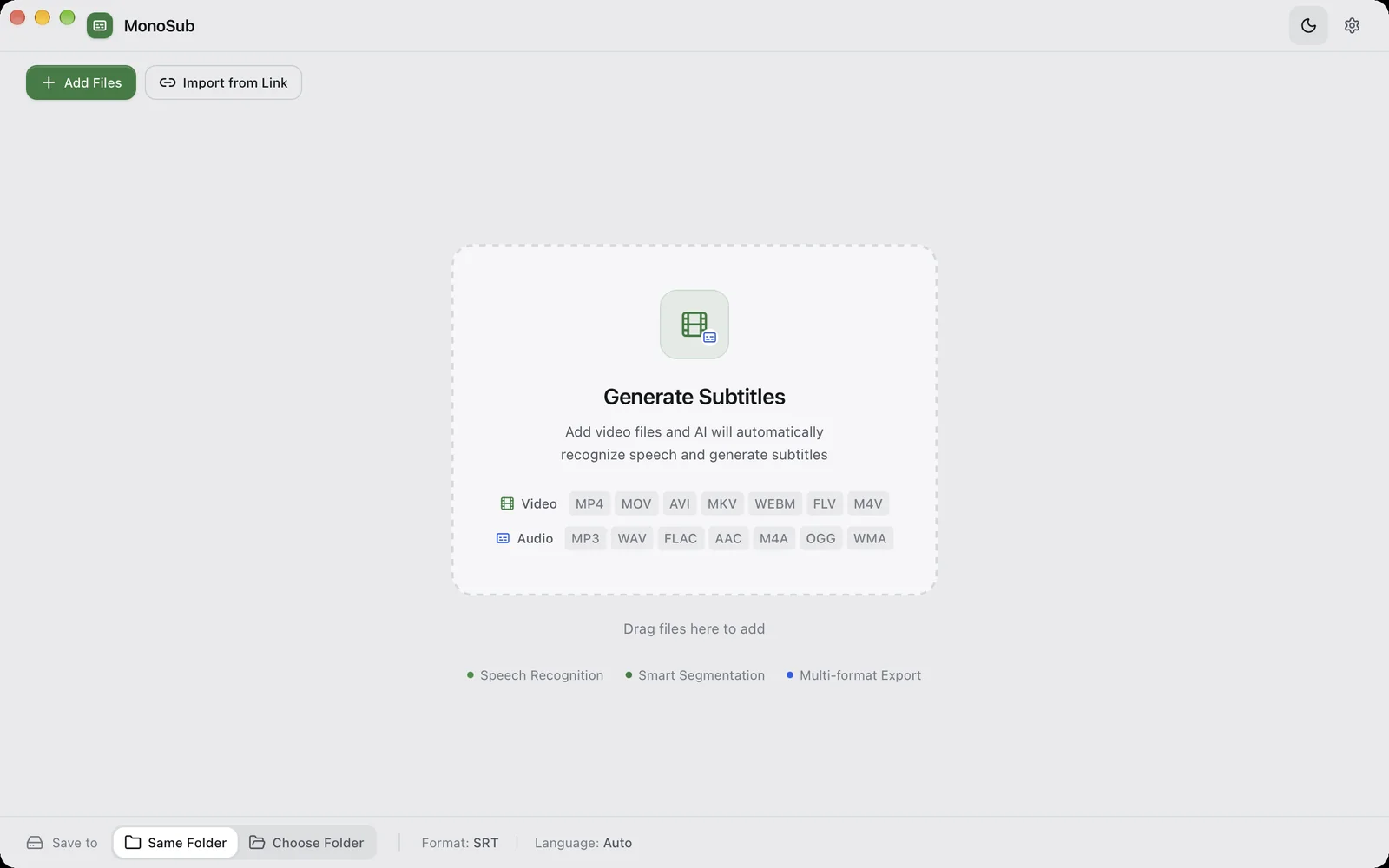
The main window — drag in files or paste a link.
The short answer
Yes — you can generate subtitles without sending the file anywhere.
MonoSub is a desktop app that transcribes and translates your audio locally. Drop in a file, choose a model, and get SRT, VTT, TXT, Markdown or JSON back. The speech engine and the translation model run on your own hardware, so nothing is uploaded and nothing needs a connection after the model download.
- bytes uploaded — files stay on your disk
- 0bytes uploaded — files stay on your disk
- export formats: SRT, VTT, TXT, MD, JSON
- 5export formats: SRT, VTT, TXT, MD, JSON
- one-time Pro unlock; never a monthly bill
- 1×one-time Pro unlock; never a monthly bill
01 — Why local
Why not just use a cloud transcription service?
Cloud tools are convenient until the file matters — an unreleased video, a client interview, a private meeting. Uploading it means it leaves your machine and sits on someone else’s server, and per-minute billing quietly becomes a subscription. MonoSub removes the upload and the meter: the work happens where the file already is.
Cloud transcription
- Your file is uploaded to a third-party server (drawback)
- Billed per minute, or a monthly plan you forget (drawback)
- Needs a connection; queues behind other users (drawback)
- You cannot verify when the upload is deleted (drawback)
MonoSub
- Files are read on your disk and never uploaded (benefit)
- Free for single files; Pro is a one-time unlock (benefit)
- Works fully offline after the model download (benefit)
- Hardware-accelerated on Apple Silicon and NVIDIA GPUs (benefit)
02 — How it works
Three steps, and none of them involve an upload.
The same pipeline on macOS and Windows: recognition, optional translation and export all run locally.
- 01
Download and install
Get MonoSub from the App Store or the Microsoft Store, or use the free direct build. It is a normal desktop app — no account, no sign-in.
- 02
Drop in your files
Drag in one video or a whole folder. The free version runs one file at a time; Pro lifts that limit and runs the queue in parallel.
- 03
Take the subtitles out
Export SRT, VTT, TXT, Markdown or a JSON word sidecar — optionally translated into a second language and written next to the original.
The first run downloads a speech model of your choice (~250 MB) from Settings → Models. After that, transcription is fully offline.
03 — What it does
Capability without the asterisks.
Every feature below is in the free download. Pro only changes how many files you can run at once.
- 01
100% local processing
Speech recognition and translation run entirely on your machine. No uploads, no cloud — your data never leaves your computer.
- 02
Local subtitle translation
Built-in local translation models. Generate translated subtitles in Chinese, English and more with one click — fully offline, no extra cost.
- 03
Speaker separation
Automatically identifies who spoke when, cue by cue. Built for interviews, meetings, podcasts and multi-speaker recordings.
- 04
Hardware acceleration
Metal on Apple Silicon, and the same inference engines on Windows — faster local transcription and translation.
- 05
Import from a link
Paste a supported video link to take its platform subtitle, or let MonoSub download the audio and transcribe it locally.
- 06
Word-level timestamps
Word-accurate cue boundaries plus a word/silence sidecar file, so a video can be cut on the transcript.
- 07
Every export format
Export to SRT, VTT, TXT, MD and JSON — compatible with all major video editors, players and LLM pipelines.
- 08
Batch processing
Queue a whole library and let it run. The free version does one file at a time; Pro runs them in parallel.
04 — Pricing
Free to download. Pro only when you batch.
No subscription, no per-minute meter, no account. Pay once for Pro if you need to run more than one file at a time.
Free
Always freeFor a file at a time.
$0
No card, no account
- Full transcription & translation engine
- All export formats: SRT, VTT, TXT, MD, JSON
- Speaker separation & word timestamps
- One file in the queue at a time
MonoSub Pro
One-time unlockFor a folder at a time.
$9.99
$9.99 / ¥48 via the App Store · or ¥36 / $8.60 direct
- Everything in Free
- Unlimited files in the queue
- Batch your whole library in parallel
- Free minor updates
What Pro actually unlocks
Exactly one thing: the single-file limit. Every capability — speaker separation, word timestamps, translation, every export format — is in the free version. Pro is for people who process a folder, not a file.
Where to get it
| Platform | Price | How Pro works |
|---|---|---|
| macOS · App StoreChina availability pending filing | Free | In-app purchase · $9.99 / ¥48 |
| macOS / Windows · DirectLicense works on both, not device-bound | Free build | Offline license · ¥36 / $8.60 |
| Windows · Microsoft StoreSigned, one-click install, auto-updates | Free | In-app purchase · $9.99 / ¥48 |
| Any · Build from sourceSource-available licence | Free | — |
Prices in USD; the App Store and Microsoft Store charge in your local currency. The App Store listing is live in the US and most regions — mainland China is pending filing.
Questions
The questions people actually ask.
Short answers. If yours is missing, the blog goes deeper.
Does MonoSub upload my files?
Is it really free?
What does Pro cost, and is it a subscription?
Which platforms are supported?
Do I need an internet connection?
Which languages and file formats work?
Can I process a whole folder at once?
Is the App Store version available in China?
Your videos are already on your machine. Keep the text there too.
Download free and transcribe your first file in minutes. Unlock Pro only if you batch.
- Free download
- No account
- One-time Pro